Journal entry
Best Mount for Standing Desk Laptop Setups

A standing desk makes one problem obvious fast: your laptop is always in the wrong place. It sits too high next to your monitor, too low when you need the keyboard, or right in the middle of the desk where your mouse hand wants to be. If you're looking for the best mount for standing desk laptop setups, the real question is simpler. Where should the laptop live when the desk moves?
That answer depends on how you use the MacBook. Closed and docked is one setup. Open as a second screen is another. The wrong mount is usually not bad hardware. It just solves the wrong version of the problem.
What the best mount for standing desk laptop needs to do
A standing desk adds movement, and movement changes the constraints. A mount that feels fine on a fixed desk can wobble, shift, or become annoying once the desk goes up and down several times a day.
The first requirement is stability. Not just "it holds the laptop," but "it keeps holding it when the desk rises, lowers, and settles." If the mount flexes, the laptop shifts. If it clamps to a weak point, you get vibration every time you type or lean on the desk.
The second requirement is cable control. A laptop mount on a standing desk only works if the cable path works with the desk travel. This matters more than most people expect. A clean-looking setup at sitting height can turn into a snag point at standing height.
The third requirement is access. Some people never touch the laptop once it's docked. Others need Touch ID, the headphone jack, or the screen itself during the day. A mount that hides the machine perfectly can be the wrong choice if you still interact with it often.
Under-desk is usually the cleanest answer
If your MacBook stays closed most of the time, under-desk mounting is hard to beat. It gets the laptop off the work surface, keeps the visual line of the desk clean, and makes the whole setup feel less temporary.
For standing desks, this position also keeps the laptop traveling with the desktop. That sounds obvious, but it matters. The cable run stays consistent because the laptop, dock connection, keyboard, and monitor cable slack all move as one system.
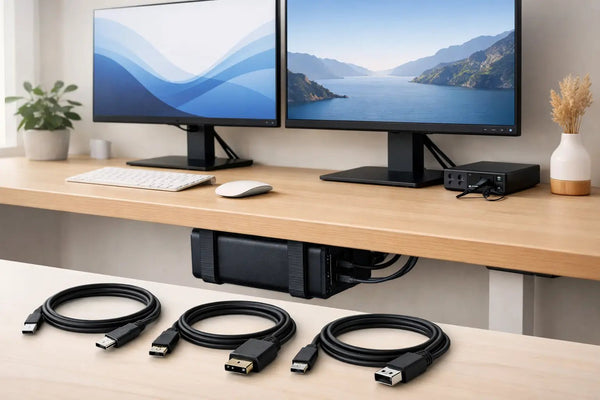
This is where an under-desk mount like the SlideUnder Pro Crossbar Edition makes sense for MacBook Pro 14 and 16 setups, especially on thicker desktops or sit-stand frames where placement gets tighter. It mounts the laptop under the desk instead of asking you to balance the machine on top of it. You dock once and leave it there. Product page: https://dockedbydesign.com/products/slideunder-pro-crossbar-edition
The trade-off is access. Under-desk mounting is for people who already know they want the laptop hidden. If you open the MacBook several times a day, this starts to feel like parking your car in a garage every time you need your sunglasses.
There's also a fit question. If you keep a bulky shell case on the laptop, most precision-fit mounts are the wrong tool. That is not a flaw. It's the point. A mount printed to tight tolerances holds the device properly because it is sized for the device, not for random extra thickness.
Edge mounts work when you still need the laptop
Some setups need the MacBook present but out of the way. Maybe you use the built-in display for Slack or music. Maybe you want Touch ID within reach. Maybe your desk frame leaves no good under-desk mounting area.
In that case, the best mount for standing desk laptop use may be an edge mount rather than an under-desk one. Mounting at the desk edge keeps the machine accessible while freeing the center of the desk. It also avoids the visual clutter of a stand planted next to your monitor.
The compromise is visibility. An edge-mounted laptop is still in the setup. Less intrusive, yes. Invisible, no. That's fine if the goal is function with less mess, not a completely disappeared desk.
Desk edge options also depend on side preference and cable direction. Left or right matters more than people think. Put the laptop on the wrong side and the charging cable crosses your leg space, or the screen opens into your monitor arm. A good mount solves placement, not just storage.
Wall mounting sounds smart until the desk moves
Wall mounts can look clean in photos. In practice, they are usually the wrong answer for a standing desk unless the wall-mounted laptop is not part of the moving desk system.
The problem is simple. Your desk moves. The wall does not. If the laptop is mounted on the wall and your monitor, keyboard, and accessories are on the desk, your cable run has to absorb that travel every time the desk changes height. That adds slack, drag, and a lot more planning than most people want.
Wall mounting makes more sense for fixed-height desks, side stations, or rooms where the laptop is stored vertically near a charging point and not actively docked into a moving setup. For a true sit-stand workstation, it usually creates more cable problems than it solves.
The cable matters as much as the mount
A laptop mount is only half the system. The other half is how the machine connects when it's hidden.
If your desk goal is one-cable docking, use a cable built for it. Otherwise the setup fails in annoying ways: intermittent display issues, charging that falls short, or a thick cable that fights the mount. On a standing desk, cable stiffness is not a small detail. It affects how cleanly the system moves.
The SlideLink Pro USB4 80Gbps cable is built for this exact use case - power, displays, and peripherals through one cable, with enough bandwidth for serious desktop setups. Product page: https://dockedbydesign.com/products/slidelink-pro-usb4-80gbps-cable
That single-cable approach changes the mount decision. An under-desk mount becomes much more practical when docking means connecting one cable instead of reaching under the desk to wrestle with three or four.
How to choose the right mount for your setup
Start with one question: do you want the laptop hidden or available?
If hidden is the goal, under-desk is usually the best answer. It gives you the cleanest desk surface and the least visual clutter. It also pairs best with a monitor-first setup where the MacBook stays closed all day.
If available is the goal, look at edge mounting. You keep access to the laptop while reclaiming desk space. This is the better choice if the MacBook itself is still part of your workflow, not just the computer behind the monitor.
Then check the desk itself. Standing desks vary more than people assume. Desktop thickness, front edge shape, frame position, and crossbar clearance all affect what can mount where. A good-looking setup on Instagram tells you almost nothing about whether it fits your desk.
This is also where custom work matters. Some desks have odd dimensions. Some setups need a left-side mount with unusual clearance for an arm or cable tray. If your desk is non-standard, a generic clamp product is usually where the compromise starts. A custom build is often the cleaner answer because it solves your exact geometry instead of forcing workarounds.
What people get wrong when they shop for a laptop mount
The biggest mistake is shopping by category instead of behavior. "Laptop mount" is too broad. You need a mount for a closed-dock MacBook on a moving desk, or a mount for an open laptop used as a side display, or a mount that clears a specific desk frame. Those are different products.
The second mistake is treating aesthetics as shallow. It isn't. If your desk always looks half-finished, you notice it every day. People spend real money on displays, lighting, keyboards, and cable trays, then leave the laptop sitting on a stand like an afterthought. The desk never quite resolves.
The third mistake is ignoring tolerance. On a moving desk, fit matters. A loose holder feels cheap because it is doing a loose job. Tight fit is not marketing language. It means the device stays where it should, with less rattle and less visual slop.
That is why build quality in this category is not just about finish. It is about consistency. A mount printed in-house to under 0.1mm calibration does a different job than mass-market hardware designed to fit everything badly enough to avoid returns.
So what is the best mount for standing desk laptop setups?
For most MacBook users running an external display, the answer is an under-desk mount. Not because under-desk is trendy, but because it matches how a standing desk actually works. The laptop moves with the desk, the surface stays clear, and the setup feels intentional instead of stacked.
If you still use the laptop screen or need frequent access, edge mounting is the better call. You give up some of the hidden look, but you keep the machine usable without sacrificing half the desktop.
The right choice is the one that matches your daily behavior, not the cleanest product photo. Build around that and the desk starts making sense. Ignore it and you'll keep rearranging the same expensive hardware every few weeks.
A good mount should make the laptop disappear from your attention. Not because it's hidden, but because the setup finally stops asking to be fixed.