Journal entry
How to Build a One Cable MacBook Setup

A one cable MacBook setup usually fails in the same place: not at the MacBook, but on the desk. The cable part is easy. Keeping the laptop out of sight, leaving the ports accessible when you need them, and making the whole thing stable enough to use every day is the harder part.
If your MacBook is open on the desk with a hub hanging off the side, you do not have a clean setup. You have a temporary arrangement that became permanent. The fix is not more accessories. It is better placement, one good cable, and a clear path for power, display output, and peripherals.
What a one cable MacBook setup actually means
The goal is simple. You sit down, connect one cable, and your desk is ready. External display. Keyboard. Mouse or trackpad. Storage. Audio interface. Ethernet if you use it. Charging too.
That only works if three parts agree with each other: the MacBook, the dock or monitor, and the cable between them. If one part is weak, the whole setup becomes unreliable. Random disconnects. Display dropouts. Slow charging. USB devices that wake up when they feel like it.
A lot of people blame the dock first. Sometimes that is fair. But cheap or vague-spec cables cause a surprising number of problems, especially once you add high-resolution displays and power delivery into the same run.
Start with the cable, not the accessories
If you want one cable to carry the whole desk, the cable needs to be treated like a real component. Not a spare pulled from a drawer.
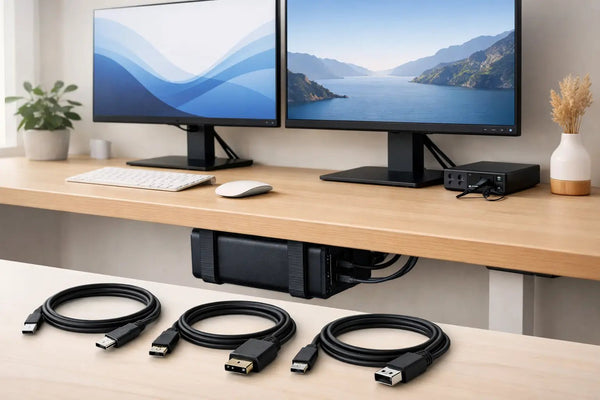
For this kind of setup, the cable should handle power, data, and display traffic without turning flaky under load. That is exactly why the SlideLink Pro USB4 80Gbps cable exists. It is built for the jobs people actually expect from a one-cable desk: charging a MacBook, driving external displays, and moving data fast enough that your setup does not feel bottlenecked by the one part nobody sees.
You can find it here: https://dockedbydesign.com/products/slidelink-pro-usb4-80gbps-cable
USB-C is the connector shape. It is not the performance guarantee. That difference matters. Two cables can look identical and behave very differently once you ask them to run power, display signal, and peripherals at the same time.
If your current setup almost works, but drops a monitor now and then or needs reconnecting after sleep, the cable is worth questioning before you replace everything else.
The real issue: where the MacBook lives
A one cable MacBook setup is supposed to clear the desk. If the laptop still sits next to your keyboard, you kept the cable count low but not the visual noise.
There are a few ways to solve that. Under-desk is usually the cleanest because it hides the machine entirely while keeping it close to the dock and display cables. Desk-edge mounting works better if you want quicker access. Wall mounting makes sense in some studios, but it is less common for everyday home office desks.
For most MacBook users, under-desk is the point where the setup finally feels finished. The laptop disappears, the single cable comes up exactly where you need it, and the desk surface stops being a parking lot for expensive hardware.
If that is your layout, the SlideUnder Pro Crossbar Edition is the mount I would look at first for MacBook Pro 14 and 16 setups, especially on thicker desktops or sit-stand desks where rigidity matters. It locks the placement down better than a generic tray approach and keeps the machine tucked up where it belongs instead of hovering awkwardly underneath.
You can see it here: https://dockedbydesign.com/products/slideunder-pro-crossbar-edition
This is the part generic accessories tend to miss. A mount is not just a holder. It decides cable routing, access, stability, and whether the laptop still feels like an object sitting around your desk or part of the desk itself.
How to build the setup without creating new problems
The cleanest version starts with one fixed connection point. Usually that is a dock, or a monitor that also acts as a hub. Your display, keyboard, audio gear, storage, and network connection go there. The MacBook gets one upstream USB-C or USB4 connection.
From there, placement matters more than people expect. If the dock sits on top of the desk, you just moved the clutter from the laptop to another box. Better to mount or hide what can be hidden, then leave only the one cable visible at the edge or rear of the desk.
Cable length matters too. Too short and it is annoying every time you plug in. Too long and you create a loop of cable you now have to hide somewhere. The right answer depends on where the MacBook mount sits relative to your normal seating position. On a shallow desk, small differences matter.
This is where custom setups come in. Not every desk has standard depth, and not every cable path is obvious. If your frame, crossbar, drawer, or sit-stand mechanism gets in the way, forcing a standard layout usually leads to compromise. Better to solve the geometry once than live with a bad reach every day.
One cable does not mean zero compromises
There are trade-offs. There always are.
If you dock your MacBook closed, you free the desk and reduce visual noise. You also lose instant access to the keyboard, webcam angle, Touch ID position on some workflows, and the habit of using the MacBook as a second screen. For some people that is fine. For others, it changes the way they work enough that a side-mounted or edge-mounted setup makes more sense than fully hiding the laptop.
Heat is another practical concern people ask about. A proper mount should hold the MacBook securely without wrapping it in foam or blocking every surface around it. The point is controlled placement, not stuffing the laptop into a padded slot. If your current stand or tray traps heat, that is a design issue.
Cases are a common problem too. A fitted mount is designed around the machine, not around every possible shell or skin somebody might add later. If you keep a case on your MacBook, check dimensions carefully. A clean mount works because tolerances are tight. The same reason it looks right is the reason it may not fit extra bulk.
The best one cable MacBook setup for different desks
There is no universal layout because desks are not universal.
If you use a fixed desk with decent underside clearance, under-desk mounting is usually the cleanest answer. It hides the MacBook, shortens visible cable runs, and keeps the top surface clear for the things you actually touch.
If your desk sits against a wall and you want easier side access, an edge mount can make more sense. The laptop stays off the work surface but remains easier to reach than an under-desk mount. That is useful if you disconnect often or swap devices during the week.
If your setup is more studio-like than office-like, wall mounting can work well. It separates the computer from the desk entirely and can make cable routing cleaner if your display and power are already managed nearby. It is less flexible if your desk moves often.
The right answer depends on how often you dock, whether you work clamshell or open-lid, how much underside clearance your desk has, and whether your monitor or dock already defines the cable path.
Why cheap fixes rarely stay fixed
A lot of bad desk setups are built from parts that solved one small issue at a time. First a hub. Then a stand. Then cable clips. Then a second stand because the first one looked bad. Then a longer cable because the dock ended up in the wrong place.
That stack of small fixes usually costs more attention than money. Every day, you see the compromises. The laptop is in the way. The hub is visible. The cable bends awkwardly. You unplug one thing and the whole layout shifts.
A proper one cable MacBook setup works because the physical design is decided up front. Where the MacBook sits. Where the connection point is. Which cable handles the load. After that, the desk gets quiet.
That is also why the details matter. A mount printed in-house to under 0.1mm tolerance is not trivia. It is the difference between something that looks custom because it fits correctly and something that looks generic because it is.
Keep the desk honest
If your setup still needs a stand, a hub, and a loose charging cable visible on the surface, it is not one cable in any meaningful sense. It is just fewer cables.
The version worth building is the one you stop noticing. Sit down. Connect once. Work. When the desk disappears, the setup is doing its job.
That is the standard to aim for. Not minimal for the photo. Clean enough that it stays clean on a Tuesday afternoon when you are busy and not thinking about your desk at all.