Slide Series · Made in Rotterdam

SlideWall Elite (Macbook)

Same wall dock. Different material, and a different lifespan.

The Elite is the SlideWall printed in PETG-CF: PETG with chopped carbon fiber running through it. I switched to it for one reason. PLA gives up in the heat. Leave a standard dock on a sunny wall through a summer and it can soften and slowly lean. PETG-CF holds its shape up around 80 °C, where PLA starts to go at about 55. It is also stiffer under load, so it will not creep with a MacBook hanging in it day after day, and it shrugs off the knocks that come from reseating the laptop a few times a day.

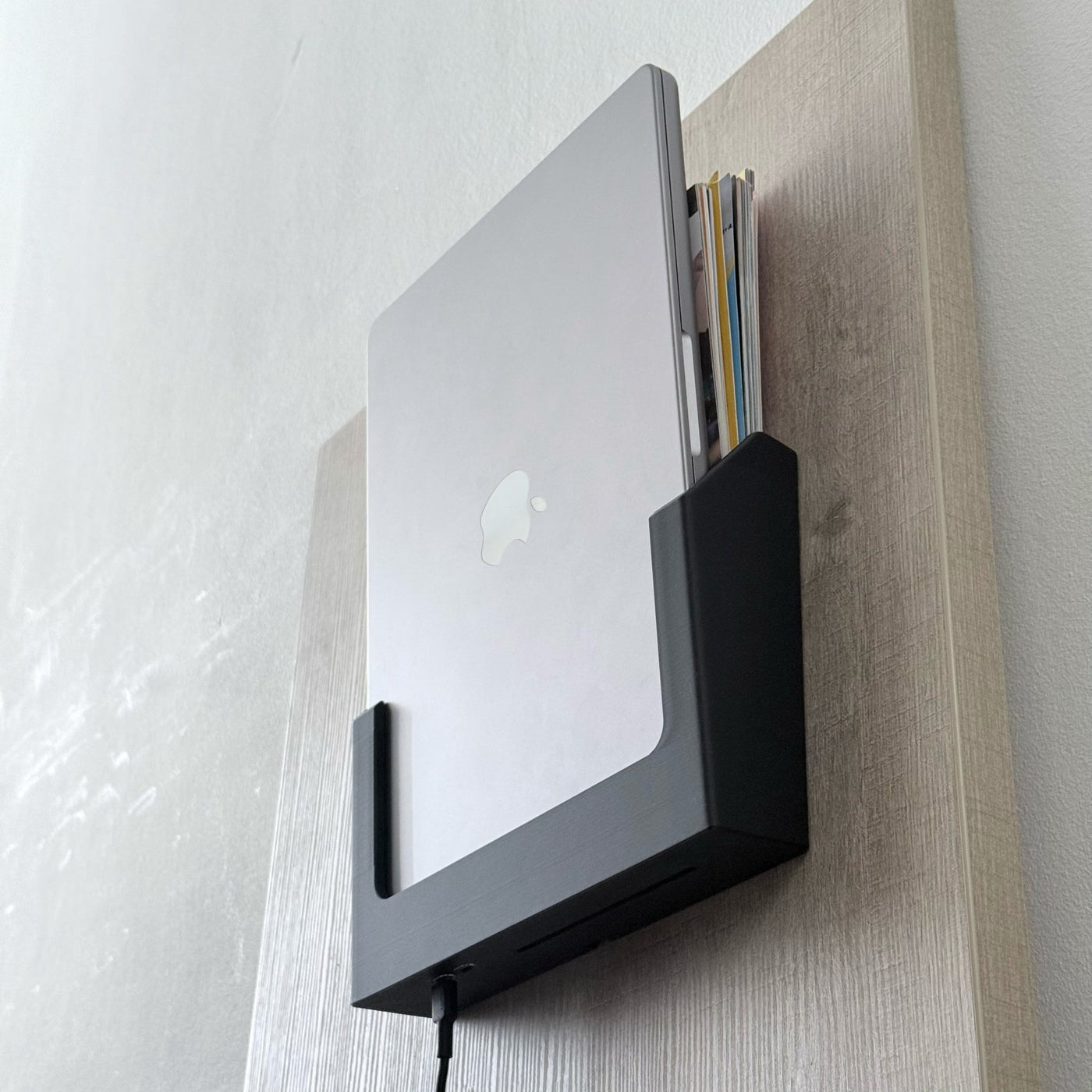
Everything else is the SlideWall you already know. It mounts flat to the wall and angles outward. Your MacBook slides into the front slot, Apple logo facing you, connecting at the bottom. The slot is shaped to the curve of the MacBook's bottom corners, so it only goes in the right way. The slot behind it still holds a notebook or a stack of paper.

It fits the MacBook Air 13" (M2 to M5) and the MacBook Pro 14" (M1 to M5). Two screws, one washer, about ten minutes with a drill.

If your dock lives somewhere warm, somewhere bright, or somewhere it gets handled hard, this is the one I would buy. If it sits in a cool, shaded corner, the Standard will serve you fine and save you money. I would rather say that than sell you carbon fiber you do not need.

Printed and checked by hand in Rotterdam.

  • 5.0★Rating
  • 0–2 daysShips in
  • 40% off shippingOver €150
  • +300docks shipped
€144,99 In stock · ships in 48 h
Choose tier Standard €79,99 40 Gbps | 100W | PLA Pro €109,99 80 Gbps | 240W | PLA
Elite80 Gbps | 240W | PETG-CF Carbon fibre reinforced
From €144,99
  • Heat-stable to 80 °CHolds shape on sunlit desks and warm rooms.
  • Stiffer under loadCarbon-fiber reinforced - won't sag or creep with the MacBook seated.
  • Daily-use toughHigher impact resistance than PLA - survives reseating, knocks, and bumps.
up to €164,99
Color Black

Buy 2 or more — save 5% automatically at checkout.

    Built to mount, then disappear into the wall

    Spec sheet

    No spec rows set yet. Add entries to specs.spec_rows on this product.

    Pick the tier for your wall

    Standard · Pro · Elite
    Standard Single-cable desk, Air 13 and Pro 14
    Pro 240 W and TB5, Pro 14 and 16
    EliteThis page Heat-stable carbon fiber, Air 13 and Pro 14
    Bandwith 40 Gbps 80 Gbps80 Gbps
    Power delivery 100W 240W240W
    Enhanced airflow No YesYes
    Increased UV resistance No NoYes
    Material PLA PLAPETG Carbon Fiber

    One and two screws, done.

    Install · 5 to 10 min
    01

    Test fit and connectors

    Slide your MacBook into the front slot, Apple logo facing forward, connecting at the bottom. The slot is shaped around the curvature of the MacBook's bottom corners, so it only seats the right way. Plug in a USB-C cable and confirm the connection holds before you drill anything.

    2 min
    02

    Mark the washer position

    Hold the dock flat against the wall where you want it. At the center bottom there is a cutout; this is where the washer sits. Mark that point with a pencil, then mark a second dot 7 mm above it. That upper dot is where the washer goes before you slide the dock into place.

    2 min
    03

    Place the washer and level the dock

    Pre-drill or just screw into the upper dot with a washer Then slide the dock down over it so the cutout locks onto the washer. Straighten the dock (eyeballing is usually fine, or use a bubble level if you want it exact). Once level, mark the two top screw holes through the mounting holes.

    2 min
    04

    Drill and mount

    Remove the dock and drill pilot holes at the two marks. Put the washer back, slide the dock over it, and drive in the two screws to secure it. Tighten until firm, not forced; the washers protect against over-tightening.

    3 min
    05

    Slide in and connect

    Slide your MacBook into the front slot, Apple logo facing forward. Connect your USB-C cable and route it neatly along the wall. The rear slot is ready for documents or a notebook whenever you want it.

    1 min

    From customers

    How it lands on real walls

    Reviews

    What customers say

    Customer Reviews

    Be the first to write a review
    0%
    (0)
    0%
    (0)
    0%
    (0)
    0%
    (0)
    0%
    (0)

    Frequently asked

    Before you mount it

    Can the MacBook go in the wrong way?

    No. The front slot is shaped around the curvature of the MacBook's bottom corners, so it only seats one way: Apple logo facing forward, connecting at the bottom. If you try to insert it backwards, the shape stops it.

    What is the rear slot for?

    It is a built-in storage slot behind the dock for documents, notebooks, or anything flat. It keeps the wall space useful beyond holding the MacBook.

    What is it made from?

    Standard and Pro is printed in PLA, each one printed and hand-checked in Rotterdam. Elite steps up to PETG-CF carbon fiber, heat-stable to around 80 °C and stiffer under load, for docks that live on sunlit walls or in warm rooms where standard prints can soften.

    Can I take the MacBook out without unmounting the dock?

    Yes. The MacBook slides out freely; the dock stays on the wall. Pull it out when you need to travel, slide it back when you return.

    Returns and warranty?

    30-day no-questions returns, with return shipping covered inside the EU.