Skip to product information
1 of 4

DockedByDesign

SlideWall Pro (Macbook)

SlideWall Pro (Macbook)

Regular price €109,99
Regular price Sale price €109,99
Sale Sold out
Taxes included. Shipping calculated at checkout.
Model
Color
Quantity
🔩
Installation guide
Step-by-step · ~5–10 min · Screwdriver or drill
View →

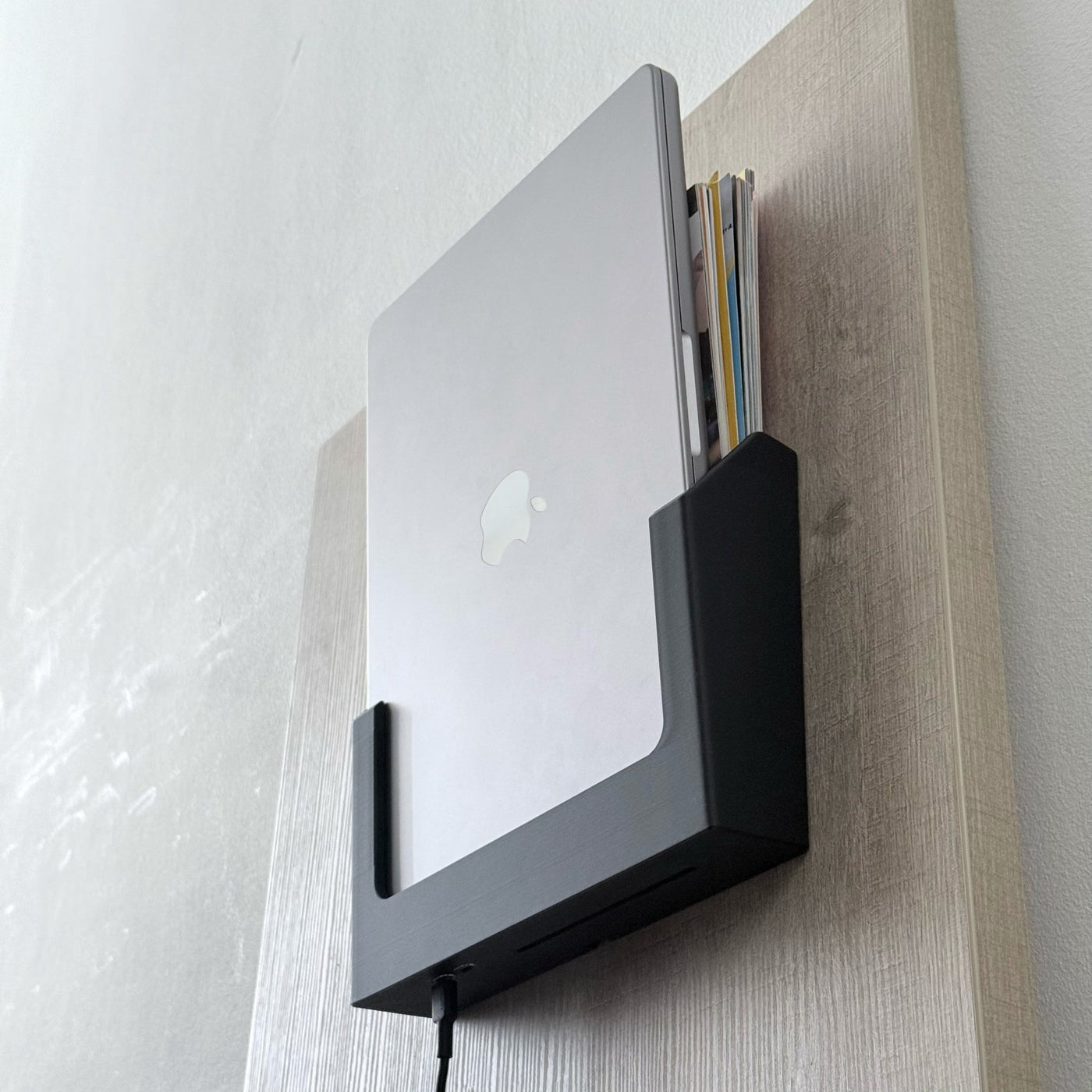
Mount your MacBook Pro on the wall — beautifully. The SlideWall Pro is a precision-fit vertical wall dock with an integrated Thunderbolt 5 port delivering up to 80Gbps bandwidth and 240W charging through a single cable. Slide your MacBook in vertically, tuck your documents behind it, and turn any wall into a structured workspace station. Compatible with MacBook Pro 14" (M1–M5). Precision-printed in the Netherlands.

View full details
80Gbps
Max Bandwidth
240W
Power Delivery
€109,99
Starting From
🇳🇱
Made in Netherlands

Your wall. Your workspace.

SlideWall Pro is not just a mount — it is a statement. Vertical. Intentional. Fully connected. Your MacBook on the wall, working at full power.

Integrated TB5 Ports
Two built-in Thunderbolt 5 ports deliver up to 80Gbps bandwidth and 240W charging through a single cable. Full-speed docking, flush against the wall.
Up to 80Gbps
🔋
240W Power Delivery
Charge your MacBook Pro at maximum wattage. One cable in the wall mount — no visible power brick, no desk clutter, no compromise.
Up to 240W PD
🖼️
Presence With Purpose
Not hidden — displayed. SlideWall turns your MacBook into an architectural element of your workspace. Visible, intentional, and always ready.
Vertical display
📁
Built-In Storage Slot
The open rear slot holds documents, notebooks, or folders behind your MacBook. Your wall becomes a vertical workspace station — not just a mount.
Document storage
🎯
Precision Fit
Engineered exactly around MacBook Pro 14" dimensions — not a universal holder with padding. Slides in clean, holds firm, looks intentional.
MBP 14" specific
🏗️
Reinforced Construction
Thickened PLA with reinforced structural geometry. Built to hold your MacBook Pro vertically, permanently, without flex or shift — day after day.
Bambu Lab PLA

On the wall in minutes

Three screws and a washer. One cable. A completely transformed workspace.

1
📍
Mark the Foundation
Hold the mount against the wall and mark the center bottom. Measure 7mm up — that's where your foundation screw goes, dropping into the hole at the base of the mount.
2
🔧
Set the Foundation
Drill and set the bottom screw with its washer. Hang the mount on it — this aligns everything perfectly before you commit to the other holes.
3
🪛
Lock It In
Mark and pre-drill the top-left and top-right holes through the mount. Drive in both screws with washers. Three points, rock solid.
4
💻
Plug In & Slide
Connect your Thunderbolt cable to the built-in port, slide your MacBook in vertically. Charging, connected, displayed. Done.

Standard vs Pro — which is right for you?

Both SlideWall models mount beautifully. The Pro adds Thunderbolt 5 speeds for power users who want maximum bandwidth and charging in one cable.

Feature Standard ⚡ Pro (This one)
Integrated USB-C ports Dual USB-C Dual TB5
Max Bandwidth 40Gbps 80Gbps (TB5)
Power Delivery 100W 240W
MacBook Pro 14" M1–M4
MacBook Pro 14" M5
MacBook Air 13" / Neo
Document storage slot
Reinforced construction
Made in Netherlands
Price from€79,99€109,99

Technical Specifications

Everything you need to know before you buy.

⚡ Performance
  • Thunderbolt 5 — up to 80Gbps
  • Up to 240W power delivery
  • TB4 compatible — unlocks full speed with TB5 machine
  • 2× integrated TB5 ports
  • Optimized for clean cable routing
🖥️ Compatibility
  • MacBook Pro 14" (M1–M4)
  • MacBook Pro 14" (M5)
  • MacBook Pro 14" only — MBP 16" coming soon
  • For Air 13" / Neo → SlideWall Standard
  • Vertical slide-in fit
🏗️ Materials & Build
  • Reinforced unibody Bambu Lab PLA
  • Thickened structural layers
  • Open rear document storage slot
  • Clean architectural form
  • Designed for permanent wall install
📦 In the Box
  • SlideWall Pro mount (model-specific)
  • Mounting screws (×3)
  • Washers (×3)
  • Wall anchors included
  • Install guide included

Frequently asked questions

Still have questions? Contact us — usually replies within a few hours.

Both models have dual integrated USB-C ports built into the mount. The Standard delivers 40Gbps and up to 100W charging. The Pro upgrades to Thunderbolt 5 — 80Gbps with up to 240W charging — plus a reinforced construction. Both look identical on the wall.
The SlideWall Pro currently supports MacBook Pro 14" (M1–M4) and MacBook Pro 14" (M5). MacBook Pro 16" support is coming soon. If you have a MacBook Air 13" or MacBook Neo, the SlideWall Standard is the right choice.
Yes — the open rear slot is designed for more than just your MacBook. Slide notebooks, folders, or loose documents behind it. Your wall becomes a full vertical workspace station.
Installation requires 3 small screw holes — one at the bottom center (your foundation point, 7mm above the base of the mount) and one each at the top-left and top-right. All screws use washers for a clean, secure hold. We recommend mounting into a wall stud where possible — wall anchors are included for other wall types.
Orders are printed on demand and dropped off with the carrier within 1–2 business days. Delivery then takes an additional 2–5 days on top of that. You'll receive a tracking link as soon as your order ships.
Yes — 14-day return policy, no questions asked. Just contact us and we'll sort it out.

Your wall is ready for this.

Turn unused wall space into a premium workspace station. One mount. One cable. Total transformation.

✓ 14-day returns ✓ Ships in 1–2 days ✓ Made in Netherlands ✓ TB5 ready