Journal entry
Vertical MacBook Desk Storage That Works

A lot of desk setups look clean until you notice the laptop. Then it becomes the one object with no real home. It sits half-open beside the monitor, eats up mouse space, and turns a carefully planned setup into a holding area. That is usually why people start looking for vertical MacBook desk storage. Not because they need another accessory, but because the desk has one unresolved problem.
The fix sounds simple. Stand the MacBook upright. Get it off the surface. Keep it docked. In practice, the details matter more than the idea. A bad vertical mount solves one problem and creates three more - blocked ports, wobble, heat buildup, or a clamp that looks like it came from an office supply bin.
What vertical MacBook desk storage is really solving
Most people think this is about saving space. It is, but that is not the main reason. The real benefit is visual control. Your monitor becomes the center. Your keyboard and mouse stay where they belong. The MacBook becomes infrastructure instead of desk clutter.
That matters more if you work with an external display all day. Developers, editors, designers, and anyone running a single-cable dock setup do not need the laptop in front of them. They need it connected, charged, and out of the way. Vertical storage is what makes that possible without dropping the machine in a drawer or hiding it behind the monitor where cable access gets annoying fast.
There is also a practical side. If your desk depth is limited, even a closed MacBook lying flat steals useful space. Put it vertically and you get back room for a notebook, audio interface, or just a cleaner hand position. Small desks benefit first, but even large desks feel better when the laptop is not drifting around the surface.
Not every vertical mount is actually good desk storage
This is where most of the category falls apart. A generic vertical stand on the desktop still uses desk space. Less than an open laptop, yes, but it is still another object sitting there. If the goal is a desk that disappears, that is only a partial fix.
The better question is where the MacBook should live when it is docked. On top of the desk, attached to the edge, or underneath. Each option changes how the setup feels.
If you want the machine accessible but visually minimized, edge mounting makes more sense than a desktop stand. Something like the SlideEdge Pro is built for exactly that. It holds the MacBook at the desk edge instead of in the middle of the work surface, which means the laptop stays reachable without being part of the visual field. That is a cleaner version of vertical MacBook desk storage because it removes the object from the main workspace instead of just shrinking its footprint. You can see the product here: https://dockedbydesign.com/products/slideedge-pro
If you want the laptop gone completely, under-desk mounting is the stronger move.
Vertical MacBook desk storage under the desk
Under-desk storage changes the whole setup because it treats the MacBook like fixed hardware, not something temporary. You sit down to one screen, one keyboard, one cable routine. The laptop is there, but it is no longer asking for attention.
That is why under-desk mounts often beat vertical stands for people with permanent desk setups. They clear the surface entirely. No aluminum wedge beside the monitor. No stand to dust around. No “minimal” accessory that still takes up the nicest spot on the desk.
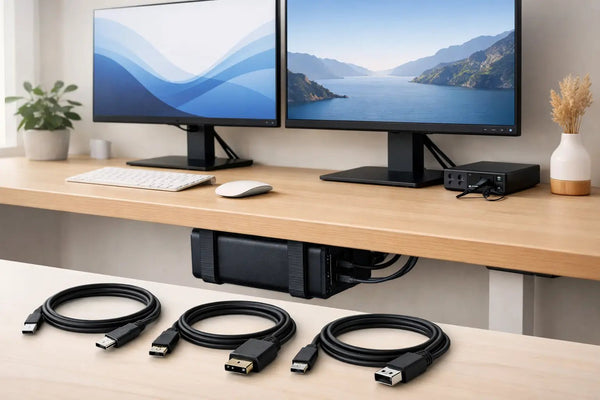
For this kind of setup, the SlideUnder Pro Crossbar Edition is the right example to look at, especially if you are running a MacBook Pro 14 or 16 or using a thicker desk where stability matters more. The crossbar format gives the mount more structure across the install point, which is useful on sit-stand desks and heavier setups. Product page: https://dockedbydesign.com/products/slideunder-pro-crossbar-edition
There is a tradeoff. Under-desk storage is less visible, which is the point, but it also means you need to think through cable direction and access before mounting. If you unplug often and carry your MacBook between rooms all day, edge mounting may be more convenient. If the machine lives docked for eight hours at a time, under-desk usually feels better long term.
Fit matters more than people expect
MacBooks are thin, but not all setups are. Cases, skins with extra thickness, desk rails, and cable heads all affect whether a mount works cleanly.
This is where most generic storage products get vague. They say they fit “most laptops.” That is usually a sign to leave. A MacBook setup is specific. Port locations are fixed. Chassis thickness is fixed. Your desk thickness is fixed. If the tolerances are sloppy, the result feels sloppy every day you use it.
That is also why 3D-printed parts can either be excellent or terrible. The material is not the issue. The calibration is. If a mount is printed and tested to under 0.1 mm tolerance, fit stops feeling like guesswork. If it is churned out with broad tolerances, you get flex, pressure points, or a laptop that rattles when the desk moves.
There is no universal answer here. Some people want a very tight hold. Others want easier slide-in access. If your desk has a non-standard lip, unusual depth, or some cable tray conflict, a custom build is usually smarter than forcing a standard bracket to behave.
Heat, airflow, and closed-lid use
This comes up every time, and it should. If your MacBook is stored vertically while docked, can it breathe?
Usually yes, if the mount is designed to hold rather than enclose the laptop. A MacBook does not need a giant open frame around it. It does need exposed surfaces and enough clearance that the body is not packed into a heat trap. Storage that presses material tightly around large areas of the chassis is the wrong approach. Storage that supports the machine at controlled contact points is much better.
The other variable is workload. If you are sending email and running a browser, heat is barely part of the decision. If you are compiling code, editing 4K footage, or driving multiple displays all day, cable quality and placement matter more because they define how stable the docked setup feels under load.
That is where a proper single-cable connection stops being a nice detail and becomes part of the storage system. The cleaner the cable path, the less friction there is in putting the laptop away and pulling it back out. A lot of “messy desk” problems are really cable problems. SlideLink Pro exists for that reason - one USB4 80Gbps cable handling the docked connection instead of a cluster of adapters and loose leads. Product page: https://dockedbydesign.com/products/slidelink-pro
The best vertical setup depends on how often you undock
If you take the MacBook with you once a week, optimize for invisibility. Mount it under the desk. Keep one cable ready. Treat it like a desktop machine that occasionally leaves.
If you take it with you twice a day, optimize for access. Edge-mounted vertical storage makes more sense because it cuts the visual mess without making retrieval awkward. You can still dock once and keep the machine out of your working area, but you do not have to reach under the desk every time you leave.
If you rarely undock but still want the laptop visible for peace of mind, edge mounting is the middle ground. Some people just like seeing the machine. Fair enough. Good storage should support that without giving half the desk back to the laptop.
This is also where left and right orientation matters. A mount that works perfectly on paper can feel wrong if it forces your cable to cross your leg space or drape over the wrong side of the desk. Storage is not only about where the MacBook sits. It is about how the whole dock path behaves when you use it every day.
What a clean setup actually requires
A clean desk is not the same as an empty desk. It is a desk where every object has a reason to exist and a fixed place to live. Vertical MacBook desk storage works when it follows that rule.
If the mount saves space but makes docking annoying, it is not clean. If it hides the laptop but creates cable strain, it is not clean. If it looks minimal in photos but needs constant adjustment, it is not clean.
The right setup is the one you stop noticing. You sit down, plug in once, and the machine disappears into the system. That can be at the edge of the desk. It can be underneath. Sometimes it needs a custom mount because your desk is not standard and your setup is not generic. That is normal.
Sunny prints these mounts himself in Rotterdam, and that matters because this category gets better when the person making the part actually understands why 3 mm of clearance or the direction of the cable exit changes daily use. That level of detail is what separates storage from a bracket.
If your MacBook is the last thing on the desk without a proper place, fix that part properly. The rest of the setup tends to click into place after it.